

Find My iPhone: what it is and what to do if your iPhone is stolen


Find My iPhone shows where your iPhone is and lets you lock it from another device. If yours is stolen, do four things in order. Turn on Lost Mode. Give the location to the police. Tell your bank and network. Keep the phone in your Find My list. We recommend you do not go to the address yourself. Tell the police instead.
What to do immediately after your iPhone is stolen
Order matters here, because each step protects something different. The first two protect the phone and your data. The third gives the police something to act on while the trail is fresh. The last two protect your money and your accounts. Work through them from top to bottom.
1. Open Find My on another device
You do not need your own phone, or a second Apple device. There are three ways in:
- Another Apple device of yours. Open the Find My app on your iPad or Mac and choose Devices.
- A family member’s device. If you use Family Sharing, your iPhone appears in their Find My app.
- Any web browser, including on Android. Go to icloud.com/find and sign in with your Apple Account.
Apple says you do not need a verification code to sign in at icloud.com/find. That matters when the stolen phone is the one your codes go to. If the site asks for a code anyway, Apple’s advice is to choose the Find Devices button instead.
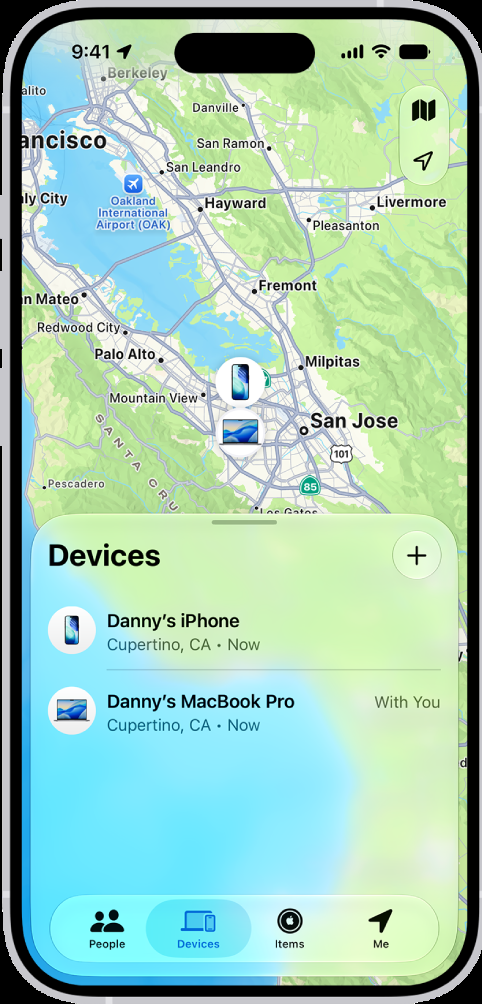
On a Mac we checked in October 2026, the Find My sidebar has three tabs: People, Devices and Items. Your iPhone is under Devices. Each device has a status line under its name, such as a place and a time, or “No location found”.
2. Turn on Lost Mode
Lost Mode locks the iPhone with your passcode and suspends the payment cards and passes you use with Apple Pay. Turn it on before anything else, even before you call anyone.
- In the Find My app, go to the Devices tab and select your iPhone.
- Scroll down to the Lost iPhone section and turn on Lost Mode.
- Follow the on-screen steps and tap Activate.
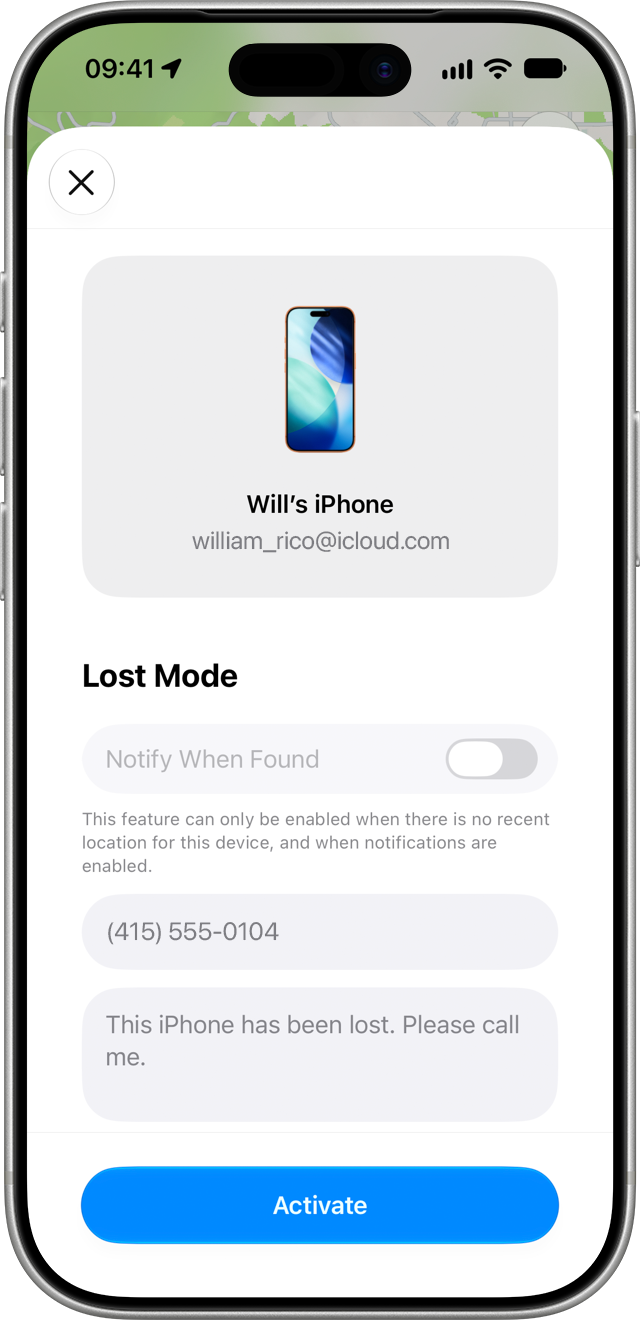
On icloud.com/find, select your iPhone under All Devices, then choose Mark as Lost.
Leave the contact details blank if the phone was stolen. Lost Mode offers to show your number on the lock screen, which helps when a phone is lost. Apple’s stolen-device guidance says not to add it after a theft, because thieves use those details to contact you and trick you.
Erasing the phone is the last resort, not the first move. Apple notes that an erase cannot be undone. If the phone is offline, the erase starts the next time it connects.
3. Give the location to the police
Find My is for tracking. Collecting the phone is a job for the police. We think this is the hardest advice in the article to follow, and the most important. The Met puts it this way: never confront a thief or risk your own safety for the sake of your mobile phone. Apple’s guidance says that if your iPhone was stolen, or shows up somewhere you do not recognise, you should contact law enforcement and not try to recover it yourself.
In the UK, the Metropolitan Police advice is:
- Call 999 if you are hurt, feel unsafe, or it happened moments ago.
- Call 101 or report online in every other case.
- Give them the IMEI, the phone’s identity number. It is usually printed on the original box. Apple says the serial number can also be found without the device.
- Share what Find My shows, with the time of the last update.
One reported location can do a great deal. In December 2024, a victim tracked their stolen phone to a courier’s site near Heathrow and reported it to the company. Officers then found boxes of stolen phones bound for Hong Kong. That report started Operation Echosteep, the Met’s investigation into what has been described as the UK’s largest phone-smuggling network. By April 2026 it had led to 14 arrests and the recovery of more than 10,000 stolen iPhones.
4. Call your bank and your network
Start with your banking apps, because money moves faster than a parcel. Sign in to each one on another device, or through online banking, as soon as the phone is locked. Check for payments you did not make, and freeze your cards if the app lets you.
Then call the bank. The Met says banks can cancel or freeze any accounts linked to the phone, and that transactions made after you report the theft may be reimbursed. Add any fraudulent payments to your police report.
Then call your mobile network. Ask them to stop the SIM, so security codes sent by text no longer reach the thief. Ask them to block the handset using its IMEI as well.
5. Change your Apple Account password
Change your Apple Account password first, then the rest. On another Apple device, go to Settings, tap your name, then Sign-In & Security, then Change Password. Without one, sign in at account.apple.com.
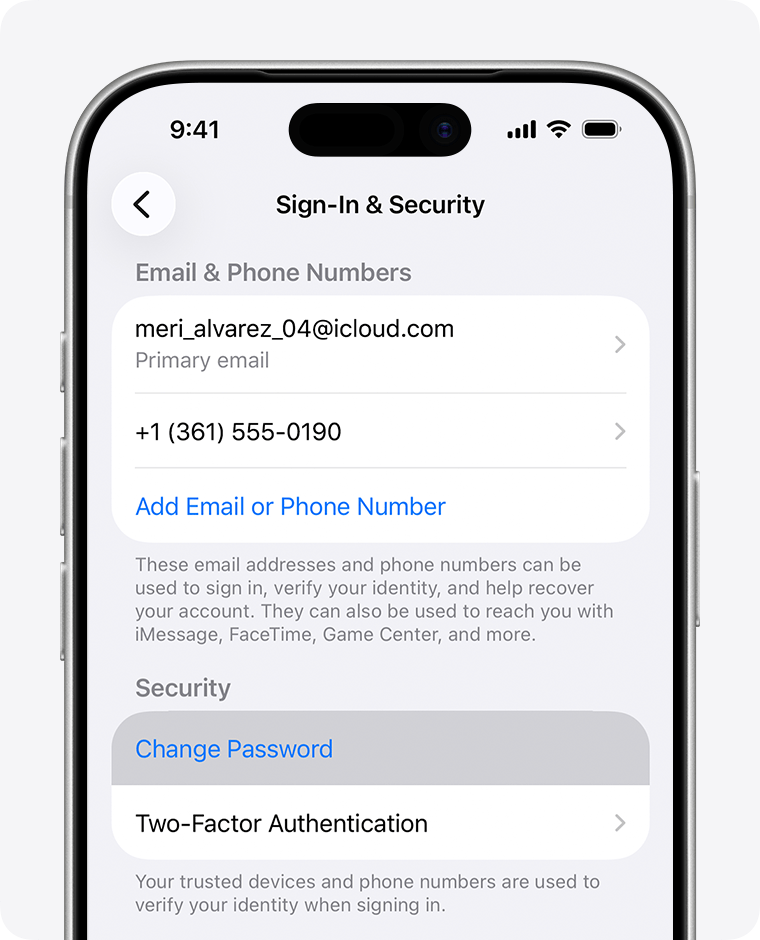
The Met’s order of priority after that is email, social media and banking apps. If your email is safe, password resets for everything else stay in your hands.
What Find My shows you, and what it means
The map is only useful if you can read it. A dot with “Now” beside it is live. A dot with an older time is where the phone last reported, not where it is. Check the time before you tell the police anything, and tell them the time as well as the place.
How to find a lost iPhone that is turned off
Switching the phone off does not always hide it. Apple’s iPhone guide says that with the Find My network turned on, a supported iPhone can be located for up to 24 hours after it is turned off. In power reserve mode, after the battery runs out, the figure is up to 5 hours. Both depend on the setting being on before the theft.
Find My iPhone last location
Once the phone stops reporting, Find My keeps its last known position. Apple says this is shown for up to seven days in the Find My app, and for up to 24 hours on iCloud.com. With Send Last Location turned on, the iPhone also tries to upload its position shortly before the battery dies.
After seven days with no report, the status changes to “No location found”. Turn on Notify When Found under the device’s name. You get an alert if it ever comes back online.
Keep it in Find My, even after you replace it
This is the easiest step to get wrong, and some guides tell you to do the opposite. When the new phone arrives, the old one still sits in your device list. It is tempting to tidy it away. Leave it there.
Apple states the reason plainly: removing the device from your Find My list removes Activation Lock. Activation Lock is what stops a stolen iPhone from being erased and set up by someone else. Remove it, and the phone becomes an ordinary used iPhone that anyone can sell.
Two details from Apple are worth knowing:
- Insurance claims. If you have AppleCare+ with Theft and Loss, Apple says not to remove the phone from Find My or your Apple Account until the claim is fully approved.
- Stolen Device Protection. Apple says to mark the phone as lost even with this feature on, because its extra safeguards only last for a period of time.
We see the other side of this as a buyer. vendi has a commercial interest here, and we would rather say so: we buy phones, so we care that stolen ones cannot be sold. A small share of the iPhones sent to us arrive locked or flagged. We check the IMEI for a stolen flag, and we do not accept them. We do not remove locks from iPhones either. A legitimate seller has Find My turned off before the phone reaches us.
You can check an IMEI yourself with our IMEI checker.
Messages that say your iPhone has been found
The theft is often only the first half. The second half arrives days, weeks or even months later, as a text or email saying your iPhone has been located. Treat every one of them as the thief getting in touch.
The reason is money. A locked iPhone is worth its parts. The same phone with Activation Lock removed sells as a working handset, and the Met found stolen iPhones from London selling for up to $5,000 in China. One thing stands between those two prices: your Apple Account password. Switzerland’s National Cyber Security Centre warned about this scam in November 2025. It says there is no known way around Activation Lock, so criminals rely on tricking the owner into handing over the key.
The messages are built to be believed. The Swiss agency published one that read “your lost iPhone 14 128GB Midnight has been successfully located”, followed by a link to view it on a map. The model, storage and colour were all correct, because the sender was holding the phone. The link opened a copy of Apple’s Find My sign-in page. Anyone who typed their Apple Account email and password there sent both straight to the thief, who could then remove the phone from the account and sell it.
This is also why we told you to leave the contact details blank in Lost Mode. The Swiss agency believes scammers get the owner’s number from that lock-screen message, or from the SIM card in the phone.
Apple’s own line settles it: “Apple will never contact you to say that your iPhone or iPad has been found.” The Mayor of London’s office, reporting Met advice in October 2026, added that police and Apple will never ask for your passwords. So the rule is short. Never follow a link in a message about your stolen phone, and never give your passcode or password to anyone who contacts you. To see where the phone is, open the Find My app or type icloud.com/find into the browser yourself.
Can a stolen iPhone still be used?
On paper, no. In practice, sometimes, and it is better to know that. With Lost Mode on and Activation Lock in place, nobody can get past the lock screen or set the phone up again without your Apple Account. A UK network block adds a second layer: the Met says UK operators can stop a stolen phone working across their networks using its IMEI.
Both layers have limits, and organised crime works in the gaps:
- A UK block is a UK block. Blocklists are shared between countries unevenly, so a phone barred here may still connect to a network elsewhere. That is why stolen phones are shipped abroad in bulk.
- Some are sold on as working phones. In the Met’s Operation Echosteep case, stolen iPhones from London sold for as much as $5,000 each in China. Nobody pays that for a brick.
- The lock is attacked through you. The Mayor of London’s office reported in October 2026 that criminals increasingly pose as trusted organisations to get passwords. That is what the “found” messages above are for.
- The rest are broken up for parts.
All of it is illegal, and all of it is happening. It does not make locking the phone pointless. It makes it the one part of this you control.
Why stolen iPhones leave the UK
The short answer is price. In the Operation Echosteep case, the Met found that street thieves were paid up to £300 a handset. Some of those phones sold for as much as $5,000 in China. The senior investigating officer, Detective Inspector Mark Gavin, said the group “deliberately targeted high-value phone brands for resale overseas”. The Home Office made the same link in September 2024, saying snatch theft was driven by demand for second-hand smartphones “both in the UK and overseas”.
One network moved up to 40,000 stolen phones from the UK to China in 2024 and 2025, according to the Met. That was about 40% of all the phones stolen in London in that period. Three men were jailed in September 2026 for nine and a half, nine, and six and a half years.
The Met’s own figures for London:
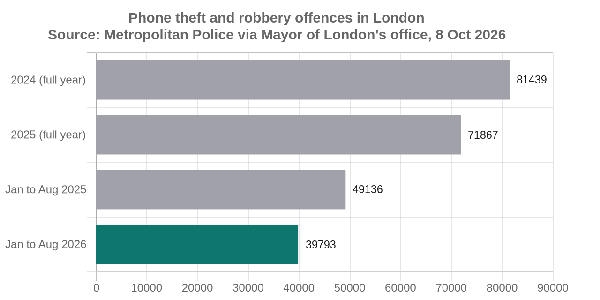
Source: Metropolitan Police, “Met seizes hundreds of stolen phones as thefts hit four-year low”, October 2026.
Across England and Wales, the Home Office reported about 78,000 snatch thefts of phones and bags in a single year, more than 200 a day (September 2024).
The London numbers are falling. The Met made more than 700 arrests in September 2026 alone and visited 220 second-hand phone shops. None of that helps if your phone went last week. What you control is the lock. A phone that stays locked is worth less to everyone in that chain.
Turn on Stolen Device Protection before it happens
Everything above works better if four settings were on before the theft. They take a few minutes, and they are worth doing on your replacement phone on day one.
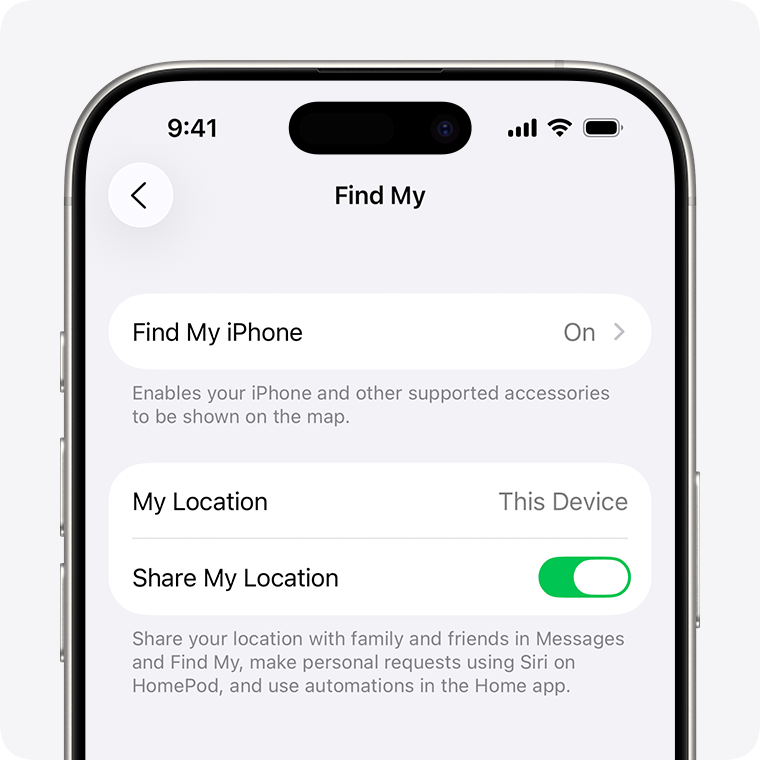
Find My iPhone, Find My network and Send Last Location. Go to Settings, tap your name, then Find My, then Find My iPhone. Turn on all three.
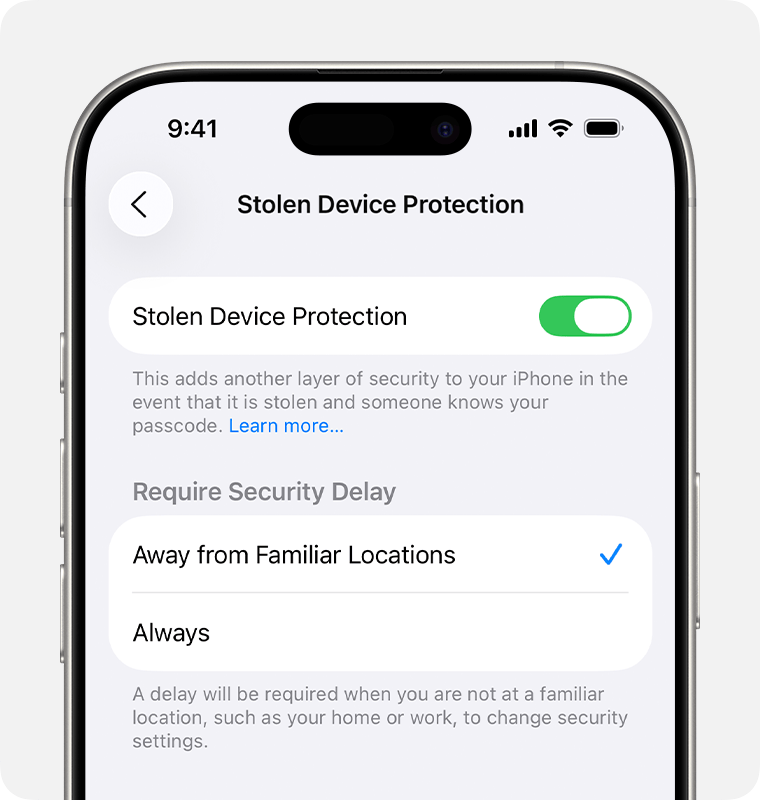
Stolen Device Protection. Go to Settings, then Face ID & Passcode, and turn on Stolen Device Protection. Apple says it needs iOS 17.3 or later. With it on, Face ID or Touch ID is required to turn off Lost Mode.
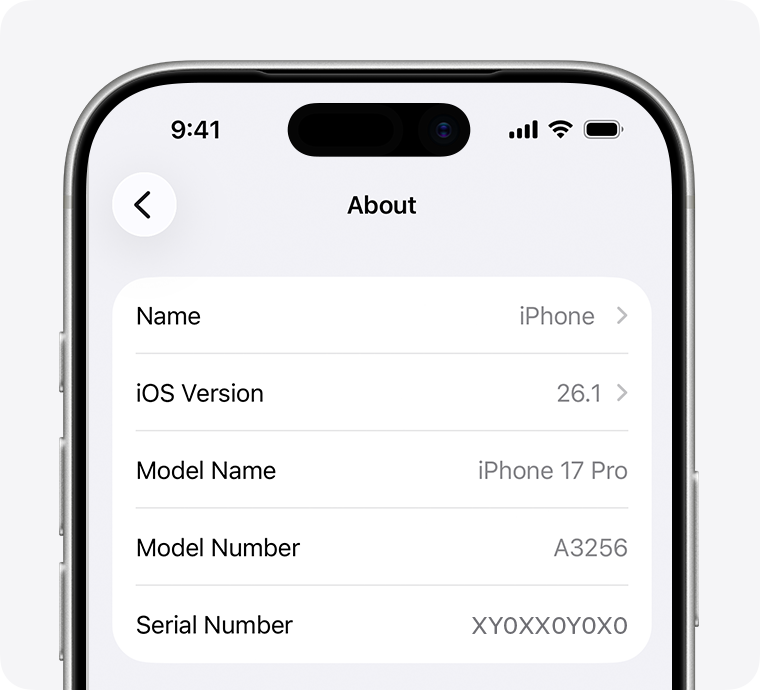
A note of your IMEI. Dial *#06# to see it, or open Settings, then General, then About. The Met advises keeping it somewhere other than the phone.
iCloud Backup. Go to Settings, tap your name, then iCloud, then iCloud Backup, and turn on Back Up This iPhone. Apple says it then backs up daily when the phone is charging, locked and on Wi-Fi. If you keep photos in Google Photos or files in Google Drive, check that backup is switched on there too.
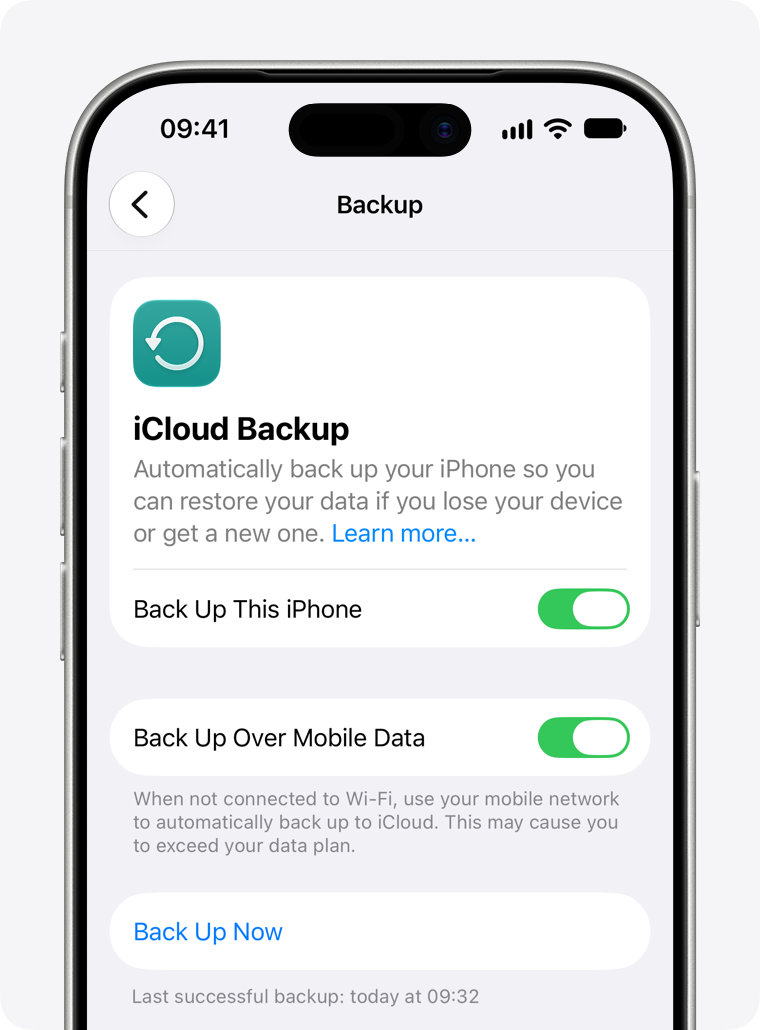
The backup is the part people thank themselves for. A stolen phone is a bad day. A stolen phone with the only copy of your photos is much worse. With a backup, you sign in on the replacement, choose From iCloud Backup during setup, and your apps and data come back.
How to stop your phone being snatched in the street
Our view is simple: the best anti-theft feature is a pocket. In London and other big cities, take your phone out on the street as little as you can. Check the map before you leave the building, not on the kerb.
The Met’s description of how it happens explains why. Thieves on bikes and mopeds approach from behind, often mounting the pavement, while the victim is talking or texting. It says most thefts happen between six and ten at night, at busy places such as stations, shopping centres and concert venues. Police in London seized more than 110 illegal e-bikes in a single month of phone-theft operations in September 2026.
A few habits make you a harder target:
- Step inside to use it. A shop doorway or a station concourse is out of reach of someone riding past.
- Stand away from the road, close to a building or wall, if you have to use it outside. This is the Met’s advice.
- Keep it short. Read the message, put the phone away, then walk.
- Go hands-free for calls. The Met notes this can stop a thief snatching the phone from your hand.
- Never leave it on a cafe table. The Met says a phone can be taken from a table in seconds.
Replacing a stolen iPhone with a second-hand one
A replacement does not have to be a new phone at full price. A second-hand iPhone can do the same job for less. The risk is where you buy it, and after reading this far you know why.
Not every stolen phone is sold abroad. The Home Office says demand for second-hand phones in the UK is part of what drives theft. A private listing on a site such as eBay or Facebook Marketplace gives you the seller’s word and little else. Apple’s advice for used phones is direct: do not take ownership of an iPhone that is protected by Activation Lock. If the screen says “iPhone Locked to Owner”, walk away.
Before you buy from a private seller, check three things:
- The screen when it wakes. Apple says a Lock Screen or Home Screen means the phone has not been erased. “iPhone Locked to Owner” means it is still tied to someone’s account.
- The IMEI. Run it through an IMEI checker before money changes hands.
- The seller’s proof. A receipt or the original box with a matching IMEI is a good sign.
The other option is to buy from a seller who has done those checks for you. We sell second-hand iPhones as well as buying them. Every device in the vendi shop is verified, and comes with a 30-day money back guarantee and a 12-month warranty (as stated on vendiapp.com in October 2026).
If you still have an older iPhone in a drawer, get an instant quote for your iPhone and put it towards the replacement. Turn off Find My and Stolen Device Protection before you send it.
FAQs
Can someone use your iPhone if they steal it?
How do I block my stolen iPhone?
What to do if someone stole your iPhone and turned it off?
Can you track an iPhone if it's lost?
How do I find my lost iPhone using someone else's iPhone?
Can I locate my iPhone without Find My iPhone?

Sell your device
Sell your preloved devices instantly at the best price on the market with same-day payment!
Sell Now